

How To Contact Facebook Business Support for Help
Your personal Facebook profile must have full admin access to a Meta Business Account with at least one Facebook page linked to it that you are the owner of. If the business you are seeking support for is not part of that Meta Business Portfolio, you can create a new Facebook page, add it to that Meta Business Profile and then use that as a dummy page to seek support for any other Facebook page or Instagram account. This is particularly useful if you have lost access to an existing Facebook page and need to recover it. To check which pages are in your Business Portfolio, click this link: https://business.facebook.com/latest/settings/
If you do not have a Business Portfolio, follow these instructions to create one: https://www.facebook.com/business/help/1710077379203657?locale=en_GB
Once you have confirmed that you have a page assigned to that account, navigate to: https://www.facebook.com/business-support-home/contact-support
You should see the information below:
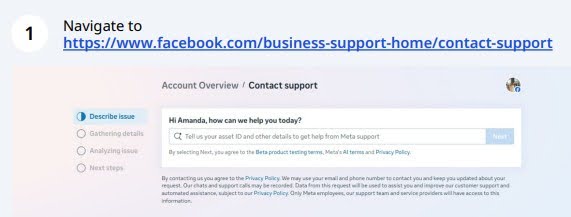
Click on “Tell us your asset ID and other details to get help from Meta support” field and tell them the issue you are having. For example, “Unable to access a Facebook Page after business ownership transfer” or “We have advertising restrictions on our account”
Where it asks for which asset you need help with, click and select any page that you own and then click the “Next” button. Note: The only way to access support for pages that you have lost ownership of is via a different existing page, so we are using this to reach the proper support channel.
In the next screen, provide further details to elaborate on the issue.
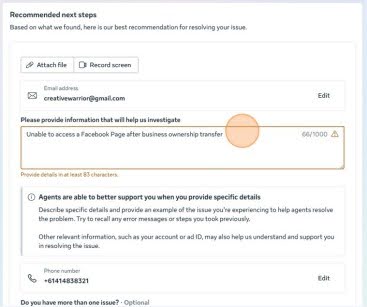
Here are some examples of information that you could provide
- We are the new legal owners of the business [enter business name], which was recently purchased from the previous owner.
- The Facebook Page [full name of the Facebook page and a link to that page showing the business ID] was included as part of the business sale.
- The previous admin attempted to transfer Page access via an invitation, but the invite did not work and has now expired.
- The previous owner has since removed themselves from the Page, and there is currently no active admin who can approve access requests.
- We are requesting full admin access to the Page so it can be managed by the current business owner.
- We can provide documentation confirming business ownership, including business registration details and proof of sale if required.
Following that, double-check that all your contact information is correct, and you will be presented with an option to chat with Facebook, and a customer service representative will then guide you through the next steps.
If you are contacting them to recover access to a lost page or one you have been locked out of, you will need to provide documentation that will include:
An official signed statement from you with a company letterhead. Your Facebook support person will provide you with a template to fill out. The requirements for this are listed below.
You will also need to do a thorough identity verification check and provide supporting business documentation in at least 2 of the following, sometimes more.
Copy of a valid government-issued ID (of the individual signing the statement); any of the following are accepted:
- Passport
- Government ID
- Driver’s License
- For Civic requests, Government Employee IDs will be accepted.
- What types of IDs does Meta accept? https://www.facebook.com/help/159096464162185?ref=cr
Signed Statement Requirements
A signed statement with the following details:
- Government Letterhead or Seal, Company Letterhead (where appropriate)
- Clear and readable signature (signed by hand or digitally confirmed)
- A description of requestor relationship to the Page and the Page ID (and authority to request access to the Page, as applicable)
- An explanation of the request (example: there has been a termination of the employment and/or business relationship with the named person(s)/Business and another person needs to be added as Admin)
- The Facebook account (URL/ID/associated email) needing to be added as an admin
Management & Declaration
One of the following:
- The name of the current person(s) who manage the Page as applicable the relationship of the above person(s) to the Business OR
- A reasonable explanation of why the current persons who manage the Page is/are not known to the requestor
- A declaration that the information you have provided is true and accurate, e.g. “I certify that the information provided is true and accurate”
Evidence of Ownership
Evidence of a claim to ownership (provide at least one supporting documentation):
- Domain Name Assignment Agreement
- Deed of Assignment of Intellectual Property
- Utility Bill
- Articles or Certificates of Incorporation, Formation, or Organisation
- Business Licenses or Permits
- DBA documents
- Tax Certs. and Licenses
- Bank Statements, Summaries, Letters
- Credit Score Reports
- Securities and Trading Documents- Trademark/registered/copyright document: e.g. Certificate of Federal Registration.

Contact The Creative Warrior Team
Recent Posts

Website Design Trends 2026: What Small Businesses Should Know
The world of digital design never stands still. Every year, new innovations and styles [...]

Website Design Checklist Before Launching Your Site
Launching a website is a significant milestone for any business, entrepreneur, or organisation. However, before [...]

Shopify vs WooCommerce: Which Platform is Best Platform?
In the ever-evolving world of eCommerce, choosing the right platform is crucial for your [...]

Optimising Product Pages for Higher Conversions
In today’s fast-paced digital world, businesses invest heavily in marketing to bring visitors to their [...]

How to Build a Social Media Content Calendar for Small Business
In today’s digital age, small businesses need more than just a social media presence—they need [...]

How AI Is Changing Keyword Research in 2026
In the fast-paced world of digital marketing, keyword research remains one of the most important [...]

Why Professional Website Design Still Matters
Why Professional Website Design Still Matters in 2026 In 2026, businesses are operating in a [...]

Startup Website Design in Perth: Affordable and Scalable Options
Starting a new business comes with its fair share of challenges. From setting up [...]


